
This post is part of a weekly series reviewing higher-education websites through the lens of prospective students and families, focusing on the information they need from a website and how well institutional sites help them find it. Reviews are published in a spirit of collegiality and support. If you notice an inaccuracy or have an issue with a website review, please get in touch.
See more college and university website reviews.
This Northwest Missouri State University website review looks at the undergraduate admissions experience from two vantage points: a high school senior in the Midwest comparing regional universities, and the parent helping that student weigh value against cost. Northwest has an unusually strong affordability story to tell. There is no application fee and no essay, merit scholarships are considered automatically, textbooks and a laptop are included, and out-of-state students have more than one path to in-state tuition. The opportunity is consistency. Program counts, enrollment, outcome rates, and cost figures change from page to page, and a careful parent will notice.
Northwest Missouri State University at a glance
- Location: Maryville, Missouri
- Type: Public regional university offering bachelor’s, master’s, and specialist degrees, with a large online and graduate population
- Founded: 1905
- Total enrollment: 9,152 (IPEDS, 2024), in the 7,500 to 10,000 band
- Athletics: NCAA Division II Bearcats, Mid-America Intercollegiate Athletics Association (MIAA)
Summary of Northwest Missouri State University Website Review
Clear strengths
- A layered affordability message: no application fee and no essay, automatic merit consideration, textbooks and a laptop included, the Bearcat Advantage for out-of-state students, an In-State Rate Guarantee for Iowa, Kansas, and Nebraska beginning in fall 2027, and the Northwest Promise covering tuition and fees for eligible families earning $75,000 or less.
- Cost & Affordability sits in the main admissions navigation, and the page states annual estimates for in-state, out-of-state, and international students in text, along with an average first-year net price and a net price calculator link near the top.
- A program finder with keyword search and filters for program type, school, and location, with each entry linking to its own program page.
- A Parents & Families page written for families of prospective students, covering cost, visits, campus life, safety, and questions about the FAFSA, Parent PLUS loans, and FERPA.
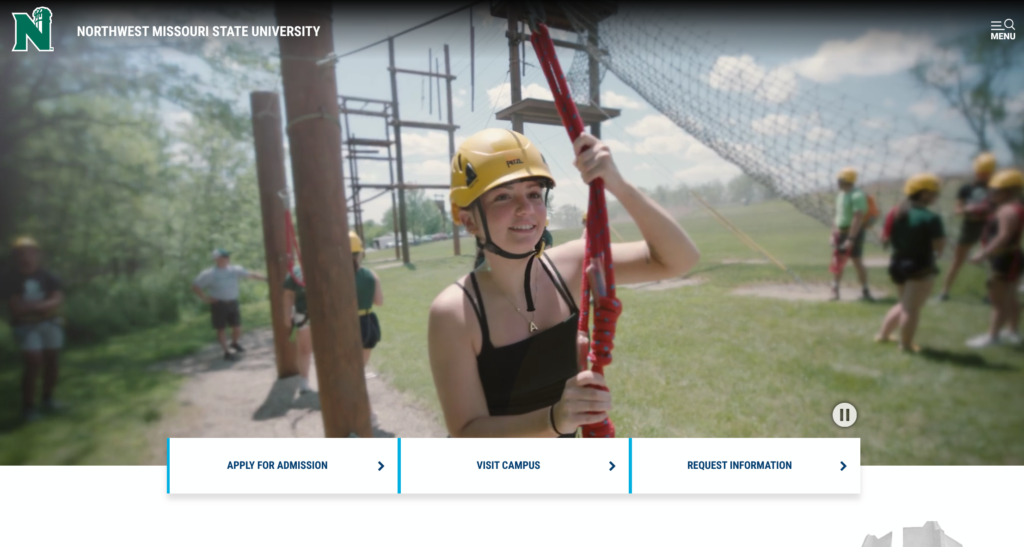
- Lighthouse Accessibility scores of 97 to 99 on all four tests, and a home page hero video with a visible pause control.
Strategic opportunities
- Key figures vary across pages. Program counts appear as 160+, 200+, and “more than 200+,” total students as 7,900 on the home page against a fall 2025 census of 8,747, and post-graduation outcomes as 95 percent on admissions and 99 percent on the home page.
- The admissions cost estimates do not name an academic year and differ from the 2026-27 cost of attendance published by financial aid.
- First-time Freshman Scholarships are displayed in an image rather than an accessible table, so students using screen readers or searching for an award amount cannot easily find them.
- Signals from two recruitment cycles appear side by side, such as a “For Fall 2026” scholarship section next to a notice that the 2027-28 FAFSA is open, and a 2022 copyright in the footer.
- On the first-year page, a $150 housing prepayment “required when you apply” and a Northwest email login needed “to complete the application” sit near a “no application fee” message. On first read, I wasn’t sure which application those sentences meant.
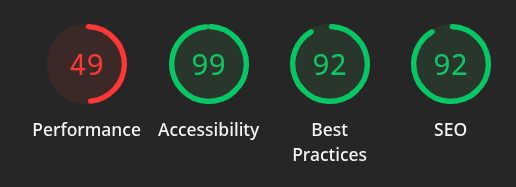
- Mobile performance scores of 32 on the home page and 49 on admissions, well below their desktop results.
Technical foundations
Northwest’s content management system appears to be a mix of Joomla, Element451, and custom setup. Pages end in .htm and load design assets from versioned template folders (/layout/v2019/ and /layout/v2022/), a pattern consistent with an in-house or custom templating approach that has been refreshed in stages. Applications run on apply.nwmissouri.edu, with a separate graduate portal, and visit registration runs on visit.nwmissouri.edu. Images on those subdomains are served from the image host used by Element451, a higher education CRM, which suggests that platform supports the inquiry, visit, and application journey. Northwest Online lives on its own subdomain with WordPress-style URLs, and the academic catalog is hosted by SmartCatalog. The global footer carries a Feedback link, Consumer Information, and Policies, alongside a 2022 copyright.
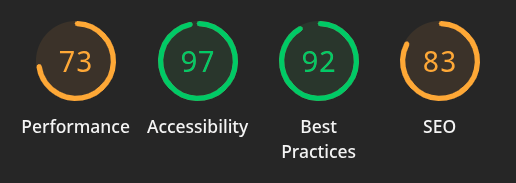
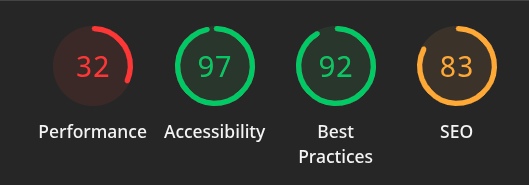
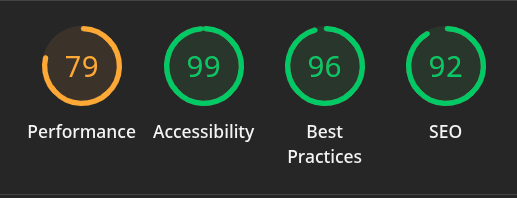
Lighthouse results point to one clear priority. Accessibility is excellent everywhere, at 97 on the home page and 99 on admissions, on both desktop and mobile. Performance is the gap. The home page falls from 73 on desktop to 32 on mobile, a 41-point drop on the page that carries a hero video, a promotional carousel, a carousel of major photos, and several large image cards. The admissions page holds up better on desktop at 79 but still falls to 49 on mobile. SEO is stronger on admissions (92) than on the home page (83), and Best Practices sits between 92 and 96.
Information architecture and findability
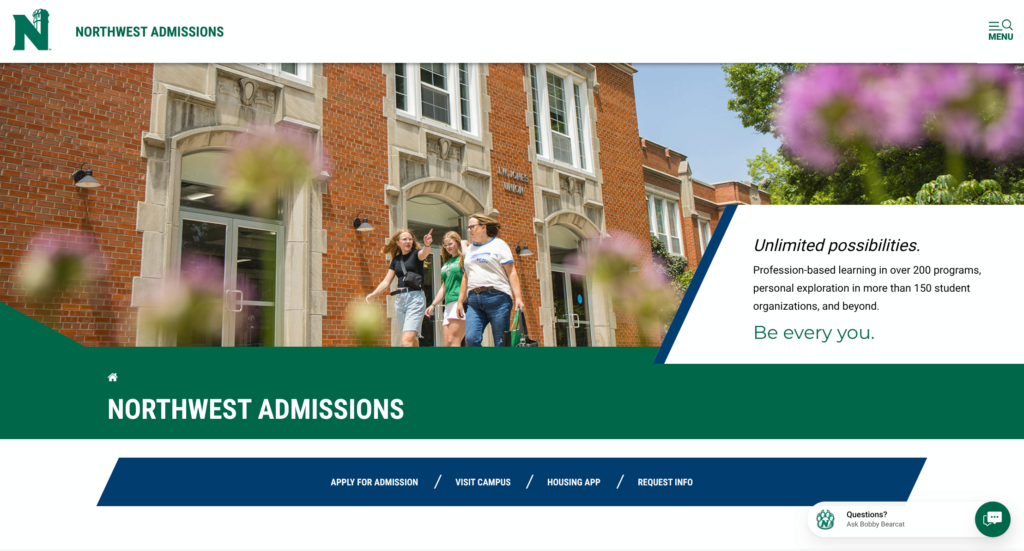
The admissions navigation is short and well organized: Northwest Admissions, an “I am…” audience menu, Majors & Minors, Cost & Affordability, Why Northwest, Explore Further, Apply Now, and Contact Us. The audience menu is thoughtful, with paths for first-year, transfer, online, graduate, international, and admitted students, plus Parents & Families and high school counselors. Apply, Visit, and Request Info repeat in consistent places on both the home and admissions pages, and the admissions landing page adds a Housing App button, a practical touch for a residential campus.
The first-year page is well paced, moving from “Application is open!” through housing, orientation, scholarships, and visits. Two items could be clearer. The site does not state an application deadline on the Apply, first-year, or criteria pages, which may reflect rolling admission; saying so plainly would answer a question families often ask. And the “Your Bearcat home starts here” section describes a $150 prepayment “required when you apply” and a Northwest email login needed “to complete the application.” In context these appear to refer to the housing application, but a reader who has just seen “no application fee” may not make that connection.
Program discovery is a strength. The Majors & Minors page offers keyword search and filters for program type, school, and location (Maryville or online), and each result links to a dedicated program page rather than to the catalog. A filter by interest area would help the student who knows what they enjoy but not what a major is called. Consistency would help understand thenumber of programs available. The admissions hero cites “over 200 programs,” the section below it “160+ major programs,” and the majors page “more than 200+ academic programs.” Each figure may be accurate by its own definition, but together they can create confusion.
Visit options are generous: weekday Daily Visits with a 90-minute student-led tour, Saturday Academic Showcases, Experience Your Major days, break-week tours, and a virtual tour. The daily visit page notes that guests who cannot walk the two-mile route can request other arrangements, a welcome detail.
Cost, financial aid, and transparency
Cost is often the center of a family’s decision, and Northwest leads with it. The Cost, Aid & Affordability page states annual estimated direct expenses of $27,540 in-state, $36,540 out-of-state, and $39,622 for international students, all in text. It shares an average first-year net price of $14,197, explains what net price means, and links to the net price calculator twice. Few sites in this series put a net price figure this close to the sticker price, and it helps a family see past the larger number.
The opportunity is alignment. The admissions estimates carry no academic year, while the financial aid office publishes a 2026-27 cost of attendance of $29,960 for Missouri residents and $38,960 for out-of-state students, with tuition, fees, housing and food, supplies, and personal expenses broken out. The two pages measure slightly different things, but a parent comparing them may not know which to trust. A related detail: the out-of-state estimate stands on its own, even though an out-of-state student with a 2.75 GPA may be eligible for the in-state rate through the Bearcat Advantage. A sentence connecting those two facts would make the out-of-state number far less daunting.
Scholarship content is substantial. First-year merit awards range from $1,000 to $10,000 and are considered automatically, and the scholarships page explains the Bearcat Advantage, the A+ Scholarship, dual credit awards, and the competitive President’s Scholarship with clear criteria. The merit tiers themselves, however, are presented as images. On the financial aid scholarships page, the Admission-Based Freshman Scholarships panel shows the full grid of GPA and test-score ranges and award amounts in a single chart image with the alt text “Merit-Chart,” followed by a PDF download. The written steps below it explain how to read the chart and give example ranges, but no award amounts. The Cost & Affordability page repeats the pattern with its own scholarship graphic. For a student using a screen reader, or a parent searching for what a 3.5 GPA is worth, the most decision-shaping numbers on the page are the hardest to reach. Publishing the tiers as an HTML table would make them readable by assistive technology and easier to find through search. The Northwest Promise, covering 100 percent of tuition and fees for eligible families with income of $75,000 or less, deserves the prominence it already has on the home page.
Accessibility, usability, and inclusivity
Lighthouse Accessibility scores of 97 and 99 reflect careful front-end work, and the pause control on the home page hero video is the kind of detail many institutional sites don’t have available. The Silktide Index, which reviewed 25 Northwest pages in September 2026, scored the site at 86 percent, with remaining items such as alt text that repeats adjacent text and focus states that could be clearer. Automated scores also cannot judge whether an image’s content is available in another form. The merit scholarship chart is a clear example: it passes as an image with alt text, yet its award amounts are not available as text on the page.
The web accessibility statement is harder to find than the site’s scores would suggest. It sits within the Title IX and Equity section, is not linked from the global footer, references WCAG 2.0 Level AA, and does not describe how a visitor can report a barrier. Bringing the statement forward would let the public posture match the quality of the work behind it.
The site speaks to a broad set of students. The audience menu includes online, transfer, international, and continuing education paths, veterans and dependents have a dedicated card on the home page, and the Parents & Families page addresses the whole family’s decision directly. Student testimonials and a confident “Be every you.” brand line give the site a warm, personal voice.
Executive lens: enrollment, risk, and governance
Enrollment and funnel. Northwest has removed much of the friction that slows applications elsewhere: no fee, no essay, automatic merit consideration, and test-optional admission through fall 2027. The In-State Rate Guarantee for Iowa, Kansas, and Nebraska, together with the Bearcat Advantage, signals a deliberate regional recruitment strategy. That strategy depends on out-of-state families understanding what they will actually pay, which makes the clarity of cost figures and the mobile performance of the home page, where many of those families will first arrive, especially important.
Risk and compliance. Strong accessibility scores place Northwest in a good position, and a more visible statement with a reporting path would strengthen it further. Varying statistics carry modest reputational risk. When outcome rates, enrollment, and program counts differ across pages, a family may reasonably wonder which figures are current.
Governance and maturity. The site shows a mature, well-structured admissions presence built across several platforms: the main .htm site with versioned templates, application and visit subdomains, a WordPress-style online site, and a hosted catalog. The mix of 2026 and 2027 cycle language and the 2022 footer copyright suggest content that is updated in pieces rather than together, which is typical of a site this size.
Recommendations
- Align recurring figures, including program count, total enrollment, and post-graduation outcomes, across the home, admissions, and majors pages, ideally with a source year.
- Add the academic year to the admissions cost estimates, reconcile them with the financial aid cost of attendance, and connect the out-of-state figure to the Bearcat Advantage and In-State Rate Guarantee.
- Publish the first-time freshman merit scholarship tiers as an accessible HTML table on both the scholarships and Cost & Affordability pages, keeping the PDF as an optional download.
- Update fall 2026 scholarship language to the fall 2027 cycle and refresh the footer copyright year.
- On the first-year page, label the housing prepayment and Northwest email steps as part of the housing application, and state the admission deadline or note that admission is rolling.
- Link the web accessibility statement from the global footer, add a way to report a barrier, and reference a current WCAG version.
- Focus mobile performance work on the home page, where the hero video, two carousels, and large image cards load on smaller devices.
An invitation to collaborate
This series exists to share what prospective students and families experience on institutional websites and to support the teams working hard to serve them. Every site reviewed here reflects real constraints, real people, and real progress. If your institution is working through questions like these, or you would like a deeper, institution-specific look at your digital experience, we would welcome the conversation.
Want to work together? Get in touch.
Disclaimer: This review is based on publicly available information at a specific point in time and reflects professional opinion offered constructively. Websites change frequently, and details may have shifted since publication. Institutions are welcome to submit corrections or updates, which will be incorporated promptly.