
This post is part of a weekly series reviewing higher-education websites through the lens of prospective students and families, focusing on the information they need from a website and how well institutional sites help them find it. Reviews are published in a spirit of collegiality and support. If you notice an inaccuracy or have an issue with a website review, please get in touch.
See more college and university website reviews.
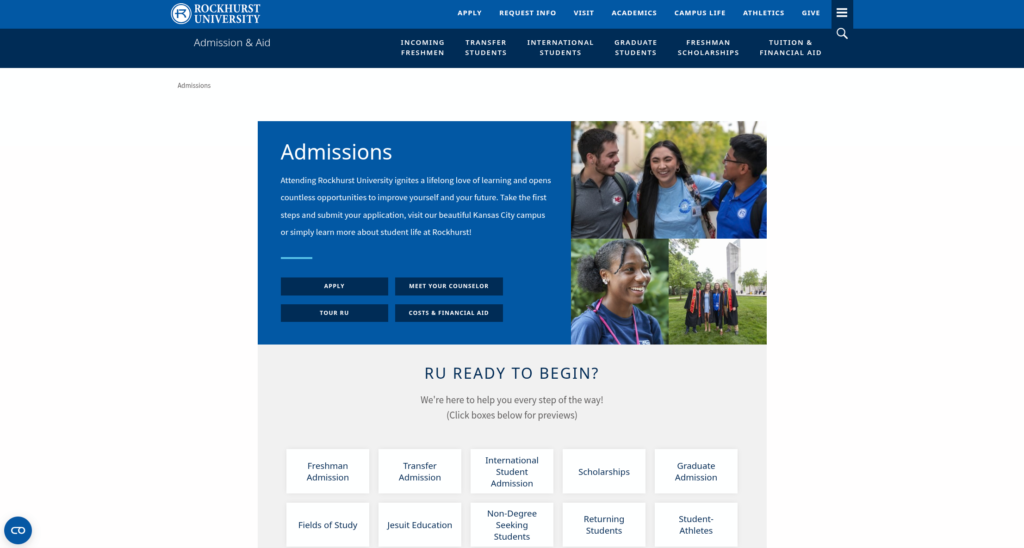
This Rockhurst University website review looks at the undergraduate admission experience on rockhurst.edu from two vantage points: a high school senior deciding where to apply, and the parent helping to pay for that decision. Rockhurst does several things families rarely find elsewhere, most notably a published merit scholarship grid that lets a student estimate an award before applying. The larger opportunity is cost. The pieces are all on the site, but a family has to assemble them from three pages and a PDF to arrive at a full-year number.
Rockhurst University at a glance
- Location: Kansas City, Missouri
- Type: Private, Catholic, Jesuit university
- Founded: 1910
- Total enrollment: 3,338 (fall 2025), including 1,964 undergraduates; 2,500 to 5,000 band
- Athletics: NCAA Division II, Great Lakes Valley Conference (Hawks)
Summary of Rockhurst University Website Review
Clear strengths
- The next step is the first item in the menu. The main navigation leads with Apply, Request Info, and Visit, ahead of Academics and Campus Life. A student who arrives ready to act can easily find what they need.
- Merit aid is published, not promised. The freshman scholarship page lists awards by GPA, from $18,000 to $28,000 a year, notes that they are automatic on admission, and already shows values for students entering in fall 2027. Few sites give families this much clarity this early.
- Applying is simple and free. Students can choose the Common App or Rockhurst’s own application, the application is free, and the test-optional policy is explained in plain language, including superscoring.
- The handoff to forms feels seamless. The request-information and visit scheduling forms carry the main site’s header and branding, so moving from browsing to signing up does not feel like leaving Rockhurst.
- The visit page thinks like a traveler. Hotels, parking, a campus map, and an introduction to Kansas City sit beside the scheduling links, which is exactly what an out-of-town family needs.
Strategic opportunities
- The cost picture is spread across several good pages. Tuition and fees live on one page, the net price calculator on another, and housing and meal rates inside a nine-page housing contract PDF. No page adds them up.
- Cost years do not quite line up. The scholarship grid looks ahead to fall 2027, the tuition page shows 2025-26 and 2026-27, and the net price calculator is based on 2025-26 costs. A current senior is estimating against three different years.
- Deadlines are hard to find. Neither the admission page, the apply page, nor the freshman application page lists an application deadline. The dates that do exist, such as the January 1 Trustees’ Scholarship deadline and the February 1 FAFSA priority date, sit deeper in the aid pages.
- Navigation forces users into a path that makes it difficult to explore further A user who clicks on Request Info doesn’t have options to go elsehwere. The Visit page sits in a section that contains information about university leadership and a university directory. Breadcrumbs don’t always show an expected path.
- Parents have a page, but it speaks to current families. The parents page is welcoming and well stocked, yet it is written for families of enrolled students. A parent of a prospective student finds useful links there, but not a path written for them.
Technical foundations
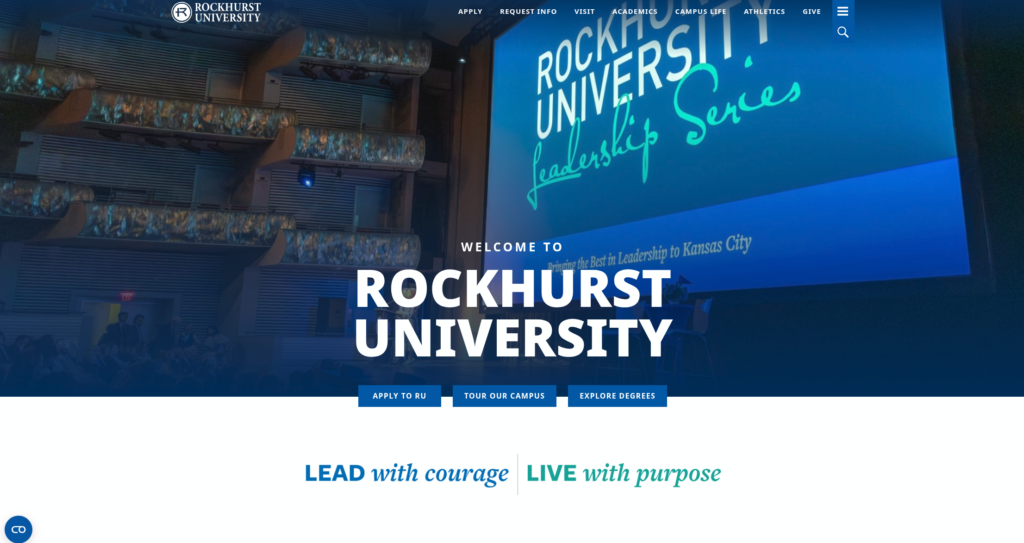
Rockhurst runs on Drupal 10, a current and well-supported version, with Google Tag Manager in place for analytics. Request-information, visit scheduling, the Rockhurst application, and the enrollment deposit run on Technolutions Slate at connect.rockhurst.edu, and the Common App is offered as a second route. The student portal runs on Ellucian, and the net price calculator is a vendor tool embedded in the page. The Slate pages share the main site’s header and visual identity, which keeps the experience consistent across platforms. The footer is tidy and includes an accessibility link, a non-discrimination notice, and a reporting link.
Lighthouse scores are steady across the board, with accessibility holding at 90 on all four pages tested. Performance is strong on the desktop home page and softens on mobile, where most prospective students will arrive. SEO scores of 100 on the admission page are an impressive accomplishment.
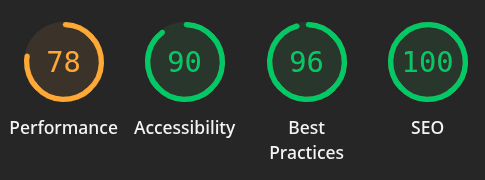


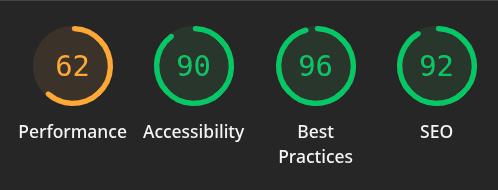
Two patterns stand out. Mobile performance drops 27 points from desktop on the admission page and 18 points on the home page, landing at 62 and 60. And an identical accessibility score of 90 on every page usually points to a shared template element rather than page-by-page issues, which means a single fix can lift the whole site.
Information architecture and findability
The home page does the essential work well. Apply, Request Info, and Visit lead the header, the opening section repeats them as buttons, and a “Find Your Program” selector with type and interest filters sits just below. Audience cards for prospective students, parents, alumni, and donors give each visitor a place to start. The prospective student card serves everyone from high school seniors to graduate students, so an undergraduate still has a sorting step ahead.
Cost does not appear in the main navigation. The clearest route runs through the admission page, where “Costs & Financial Aid” sits beside Apply and Visit, then on to the undergraduate tuition page. That pairing on the admission page is a good instinct, and it would be stronger if cost had the same standing in the header.
The Apply link in the header opens a helpful hub that routes freshmen, transfers, international students, nursing applicants, and graduate students to their own processes. The freshman page then offers the Common App and the Rockhurst application side by side, explains transcripts and test scores clearly, and links to the applicant portal. What a senior will not find on any of these pages is a date. For a student building a fall application calendar, the deadline is often the first thing they look for.
Cost, financial aid, and transparency
Cost is often the center of a family’s decision, and Rockhurst has effectively presents the necessary info. The scholarship grid is the standout. A student with a 3.75 GPA can see a $25,000 annual award for fall 2026, or $26,000 for fall 2027, before submitting an application. The page states plainly that awards are automatic and that the institutional award cannot exceed tuition. That is the kind of clarity that keeps a private university on a family’s list.
The tuition page is equally forthright, listing 2026-27 tuition of $22,995 per semester alongside every fee, including the bundled textbook program and the waivable health insurance estimate. The gap is housing and meals. The tuition page points to the housing contract, a nine-page PDF where semester room and board rates are listed among the contract terms. A family willing to add everything up arrives at a direct cost of roughly $60,000 for the year before aid, but they have to do that math themselves, across three pages and a document download.
The net price calculator is easy to reach from the financial aid page and the admission page, which is a real strength. It is based on 2025-26 costs, while the tuition page has moved to 2026-27 and the scholarship grid already looks to fall 2027. Each page is accurate for its own year. Together, they ask a family to reconcile three timelines. By comparison, the Wichita State University review noted the value of keeping cost where families already look for it, and Rockhurst is close to that standard.
The financial aid page also lists the February 1 FAFSA priority date and the federal school code, both useful details that would serve families well if repeated closer to the application itself.
Accessibility, usability, and inclusivity
Rockhurst publishes a web accessibility page with a clear contact for reporting barriers, and the accessibility link appears in the footer of every page. The page references WCAG 2.0 Level AA. Updating that reference to WCAG 2.1 or 2.2 would align it with the standard most institutions now cite. The consistent Lighthouse score of 90 suggests the remaining issues are few and shared.
The writing on admission pages is warm and plain. The test-optional explanation is a good example: short, direct, and reassuring. The request-information form, however, asks for birthdate and full mailing address as required fields before a student can submit. For a first inquiry, that is a lot to ask, and some students will stop at the first field that feels too personal.
For families, the visit page is a model of inclusive design. It anticipates the questions of someone traveling from out of state, from where to stay to where to park. The parents page offers similar care for current families. A short section written for parents of prospective students, covering cost, the application timeline, and how to visit, would extend that welcome to the families still deciding.
Executive lens: enrollment, risk, and governance
Enrollment and funnel. The site moves students from interest to action efficiently. Apply, Request Info, and Visit are never more than a click away, and the published scholarship grid gives families a reason to stay in the funnel. The two points where a prospective family is most likely to pause are the full cost picture and the application deadline. Both are answerable on the site today, but not where students and parents first look.
Risk and compliance. Accessibility posture is solid, with a published statement and steady scores. The WCAG 2.0 reference is dated, and the embedded vendor calculator is worth checking for keyboard and screen reader use, since it sits on a page families rely on. Mobile performance in the low 60s is the most visible technical risk, given that most first visits happen on a phone.
Governance and maturity. A current Drupal build, a well-branded Slate integration, and a consistent footer suggest a mature digital foundation. A few small inconsistencies show the usual wear of a growing site: financial aid lives at both /financialaid and /financial-aid, and “Freshman Scholarships” and “Scholarships” label the same destination. These are minor, and easy to tidy.
Recommendations
- Gather first-year costs on one page. A single table with tuition, fees, a typical room and meal plan, and an estimated total would let a family answer the cost question in one place, with the scholarship grid linked right beside it.
- Align the cost year across pages. When the tuition page, net price calculator, and scholarship grid point to the same entering class, families can compare figures with confidence.
- Show deadlines where students apply. Application, scholarship, and FAFSA priority dates on the admission and freshman application pages would answer a senior’s first planning question.
- Welcome prospective parents by name. A brief section or page for families of applicants would complement the strong resources already offered to current families.
- Lighten the first inquiry and the mobile load. Fewer required fields on the request-information form and improved mobile performance on the home and admission pages would make the first contact quicker for students on a phone.
An invitation to collaborate
This series exists to help institutions serve students and families well and to share what works across the sector. Enrollment and marketing leaders interested in a deeper, institution-specific look at their own digital experience are welcome to reach out. Corrections and context are always welcome and will be reflected promptly.
Want to work together? Get in touch.
Disclaimer: This review is based on publicly available information at a specific point in time and reflects professional opinion offered constructively. Websites change frequently, and details may have shifted since publication. Institutions are welcome to submit corrections or updates, which will be incorporated promptly.